


How to Automate Accounts Payable: Steps, Challenges, and Top Tools
Small teams juggle a lot with limited resources. Without smart automation solutions, routine tasks can pile up, eat valuable time, and make it harder to manage cash flow. The right tools can help your business with financial and operational workloads by turning manual tasks into streamlined workflows with faster turnaround times, fewer errors and better overall efficiency.
There are a number of ways you can automate your business processes. One key method is through accounts payable automation. Accounts payable (AP) relates to your current liabilities and the money you owe to vendors, making it an essential financial process for your business. In this guide, we’ll focus on accounts payable automation: what it is, how it works, and how it can save your business time and energy.
What is accounts payable automation and why does it matter for small businesses?
Accounts payable (AP) refers to the money your business owes vendors or suppliers after it receives a good or service. AP is essentially the opposite of accounts receivable (AR) which reflects what customers and clients owe you after providing them with a good or service. Both are important values on your balance sheet, but can become complicated with invoice processing, approvals, and closing payments on-time.
AP is a current liability for your business, and is important to monitor, process correctly, and pay to suppliers within agreed-upon deadlines. Therefore, relying on manual processing can be risky, leaving your company vulnerable to costly errors and limiting the time you could be spending on other essential tasks. Automating solutions around accounts payable will help streamline the entire process by reducing manual labor in a number of areas:
Top accounts payable tasks you can automate
Automating AP streamlines repetitive, manual work, cuts errors, and gives you cleaner workflows. Some of the key areas where you’ll see automated benefits:
- Invoice matching: Using OCR (optical character recognition) and machine learning to pull data (vendors, dates, amounts, taxes, etc.) from digital documents, scanned paper invoices and receipts. Automated data entry can then process this information for you and speed up your reconciliation.
- Automatic reconciliation: Similar to invoice matching, automated reconciliation automatically categorizes your expenses for greater efficiency.
- Vendor relations: Auto-notify vendors when invoices are received, approved, or scheduled for payments. Oftentimes, you can also automate the process of invoice corrections, reminders, and the creation of forms and invoices for vendors.
- Approval routing: Automating approvals can screen matches for you, making the process easier. Automation can also be used to keep track of approvals. This comes in handy for audit trails or keeping track of approval history more generally.
- Payment scheduling: Automation lets you schedule send payments so you can optimize cash flow while ensuring you don’t miss important payment deadlines.
Top accounts payable challenges small businesses face
Headaches are common for small teams maintaining organizational workflows over invoices, vendor agreements, and more. Knowing what challenges to expect when dealing with accounts payable will help you better improve your automated AP workflow:
- Time-consuming manual data entry: Adding dates, amounts, taxes and more by hand is a common process with accounts payable. OCR and other automated tools can make these time-consuming processes much easier.
- Missed or delayed payments: Missing payments can accrue expensive fees, harm credit and vendor relationships, and impact your overall accounting workflow. Automating transaction schedules can save you from risking missed payments in the future.
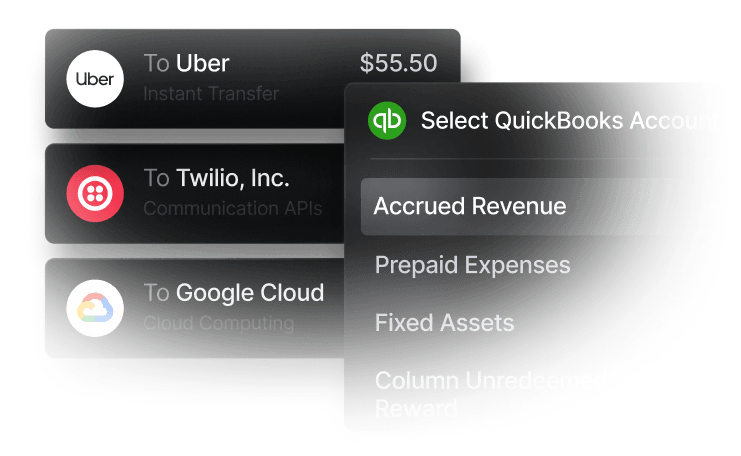
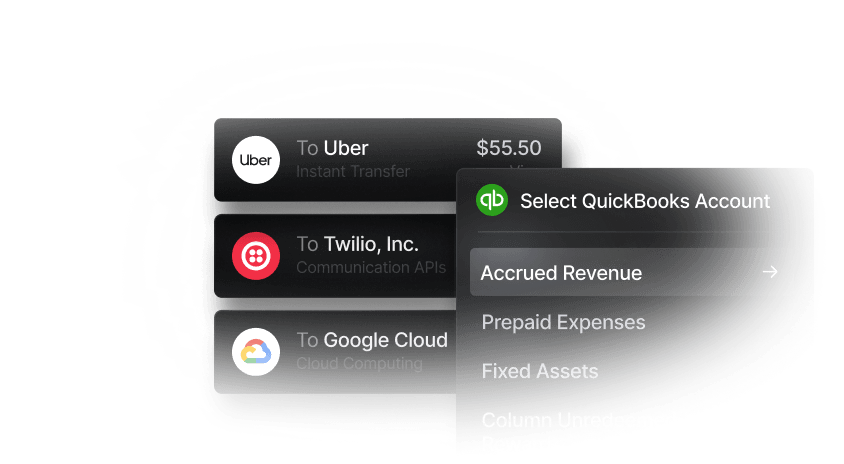
- Lack of integration with accounting tools: When your accounting is separate from your accounts payable processing, it can leave you with a lot of manual work and messy bookkeeping. Financial management platforms like Slash offer tools with built-in expense tracking features and integration with accounting tools like QuickBooks Online, Xero, and Sage Intacct. With one dashboard, this streamlines bookkeeping and AP for your accounting teams to work easier.
- Difficulty managing cash flow: It can be common for bills to land unevenly, for approvals to stall, discounts to get missed, or last-minute payments to trigger fees. Automation centralizes invoices, surfaces what’s due when, and auto-schedules payments to hit at the right time. This will help you not only optimize cash flow, but also help you avoid late fees and potentially capture discounts.
Key benefits of automating accounts payable
- Faster invoice processing and approvals: Automation may use OCR and machine learning to read digital and scanned physical paper documents for data extraction and storage.
- Fewer errors improved accuracy: Errors are expected. Automated tools can catch errors like duplicate entries, discrepancies, and fraud. Additionally, AP automation tools can be used to stop errors before they occur, offering standardized data capture and OCR or machine-learning based data matching from invoices, receipts and purchase orders.
- Better visibility into cash flow: Financial management systems like Slash offer dashboards where you can view current and upcoming obligations, payment deadlines and current cash flow statuses, giving you a clearer picture of where your cash is now and where it should be in the future.
- Stronger vendor relationships: Consistent, on-time payments and automated payment notices improve communication and reduce disputes, which can support better terms over time.
- Accounting integration: Two-way synchronization with the general ledger keeps vendor records, bills, and payments aligned and preserves a complete audit trail.
- Tangible ROI and long-term savings: Lower processing costs, fewer late fees, improved discount capture, and reduced work contribute to savings over time.
Tangible results of AP automation
By reducing manual labor and shortening turnaround times, AP automation delivers a number of tangible benefits for your business. In the list below are some of the ways your company may see tangible benefits from automating AP:
- Cut invoice cycle times: Automated routing, reminders, procurement, and invoice matching will decrease accounts payable processing time in all stages, from purchase order to invoice to receipt to approval to payment to happy vendors.
- Scale payables without growing your team: AP automation can translate to greater workload handling by same sized teams, saving you on labor costs.
- Time savings: With automation, AP processing gets easier, faster, and more efficient. Simply put, this translates to more time for you.
The standard in finance
Slash goes above with better controls, better rewards, and better support for your business.


How to Automate Accounts Payable
Step 1: Assess your current AP workflow
First, get a clean picture of your current process. To do so, it may be helpful to break down the steps in a typical accounts payable processing workflow:
- Intake: invoices may be delivered by email, PDFs, physically, or via another method. Identify where you are pulling from and where you are storing invoice data.
- Review: Check information, add PO, vendor information, project and more relevant information.
- Match: Match invoices to receipts or PO and flag any discrepancies.
- Approve: Sign-off of payments once all information has been entered and reviewed to be correct.
- Pay: Discern an optimized payment date and schedule or send correct payments then via supported transfers, typically ACH, wire, RTP or physical checks.
- Report: Store data for future audits and tax filing.
Step 2: Identify repetitive or error-prone tasks
If your team is missing payments, mismanaging matching, or struggling with another step in the process, it is important to identify where that is so you can move forward with the right automation.
Step 3: Choose software that fits your scale and integrations
There are a number of financial management and automation tools available for you. Slash is one option that can streamline your AP processes with diverse payment rail support, integrations with accounting platforms, upcoming bill pay capabilities, and invoice tracking capabilities. Additionally, Slash’s one-dashboard design allows you to easily manage the different steps in your AP process, so you can identify your problem areas and implement the right automation where needed.
Step 4: Ensure team onboarding and training
Automation can only take your team so far. Finding the right people to monitor and manage AP and other financial processes is critical. Once you have your team assembled, equip them with the right tools and access so they can succeed. The effects will help your business reduce risk and avoid missed payments.
Step 5: Monitor performance and optimize regularly
It’s not expected that you’ll find the right solutions to your AP and other financial processes right away. Staying patient, continuously monitoring performance, and implementing new solutions where they arise, are excellent methods to stay on top of your finances and continue to optimize your workflow.
Key features small businesses should prioritize in accounts payable software
Let's take a look at some features you may want to prioritize when evaluating accounts payable automation software:
- Automated invoice capture and OCR: Strong AP software should automatically capture invoice data from PDFs, email attachments, and scanned documents using OCR and AI extraction. This reduces manual entry, improves accuracy, and speeds up invoice processing, especially as invoice volume grows.
- ERP and accounting integrations
AP software should integrate cleanly with accounting systems so invoice, payment, and vendor data sync automatically. This is why Slash connects two-ways with QuickBooks Online, Sage Intacct, and Xero. Deep integrations reduce duplicate entry, simplify reconciliation, and help ensure AP automation fits into your broader finance stack rather than creating another silo. - Payment automation and fraud safeguards: The best tools go beyond invoice processing and help automate payment execution across ACH, checks, wires, or virtual cards. Just as important are controls like duplicate invoice detection, three-way matching, approval checkpoints, and anomaly flags that help prevent overpayments and fraud.
- Vendor management and reporting visibility: Strong AP platforms centralize vendor records, payment preferences, tax documents, and communication history, often through supplier portals. Pair that with Slash's all-in-one financial dashboard, and businesses can gain much better visibility into both working capital and process performance.
- Approval workflows and controls: Look for configurable approval routing based on dollar thresholds, departments, entities, or vendors. Good workflow automation reduces bottlenecks while strengthening internal controls through approval hierarchies, audit trails, and segregation of duties.
Best AP automation tools for small businesses
Managing accounts payable by hand is slow, error-prone, and expensive. Fortunately, a number of accounting platforms and financial tools now offer built-in or integrated AP automation capabilities. Here's an overview of some of the best options available today:
1. QuickBooks
Key offers: Cloud-based accounting with AI-powered bill capture, payment processing, and third-party AP integrations.
QuickBooks Bill Pay uses AI to capture bill data, and the platform includes basic bill management and invoice tracking out of the box. That said, its built-in AP automation is limited to uploading bills and paying them, with no native approval workflow or invoice capture capabilities. To fill those gaps, QuickBooks integrates with third-party AP tools like Slash.
2. Xero
Key offers: Cloud-based accounting with bill capture, batch payments, duplicate detection, and automated bank reconciliation.
Xero's built-in AP tools include bill capture via Hubdoc (included with Xero subscriptions), role-based approval permissions, automatic duplicate detection, batch payments, and automated bank reconciliation. For more advanced AP capabilities like OCR data extraction or custom approval workflows, third-party tools can be used alongside Xero. Xero integration is also supported by Slash.
3. NetSuite
Key offers: Full cloud ERP with native AP automation, AI-powered invoice capture, and configurable approval workflows.
NetSuite Bill Capture enables vendors to email or users to drag-and-drop invoices into the system, where an AI/ML engine automatically populates vendor bill fields. The platform supports two-way and three-way PO matching, configurable approval workflows through SuiteFlow, automated payment processing, and real-time dashboards for tracking AP aging and open bills. Because the entire AP workflow stays inside the ERP, finance teams maintain tighter control over approvals, payment timing, and general ledger posting. NetSuite is geared toward mid-market and growing companies that need a full ERP rather than lightweight accounting software.
4. Sage Intacct
Key offers: AICPA-preferred cloud accounting, AI-powered AP automation, multi-entity consolidation, and 350+ marketplace integrations.
Sage Intacct's AP Automation agent can create bills, match them to POs, and route approvals automatically. Its AI-powered data capture extracts vendor bill details and creates pre-populated drafts, correctly identifying vendors, amounts, dates, and line items. The platform also supports configurable approval workflows, real-time vendor-aging and payment reporting, and multi-entity AP processing from a single account. Sage Intacct offers 350+ integrations Sage through its marketplace, and Slash is among its integration partners.
5. Slash
Key offers: Business banking, corporate cards, automated expense tracking, accounting integrations, and multi-entity management.¹
On the AP side, Slash offers integrations with QuickBooks, Xero, and Sage Intacct, which enable two-way sync for your financial records across platforms. Slash's cards and payments are tracked in the dashboard to provide real-time spending insights, configurable spend controls, and AI-powered controls. Developer-friendly APIs allow businesses to build custom financial workflows. Multi-entity management lets teams toggle between dashboard views easily for all of their subsidiaries.
Smart banking, simplified: Why choose Slash for automated AP
Slash is a financial technology platform designed to offer financial tools tailored to your industry. Slash’s key offers include accounting integrations, charge cards, detailed card logs and expense history tracking, and business accounts.
The financial platform is designed to make your money management and accounting tasks, like AP, faster, easier, and more automated. Here are some of the Slash features that help users work smarter and faster:
- Expense management: On Slash’s dashboard, you can issue physical and virtual cards, set spend limits and merchant controls, and monitor transactions in real time with automated payment and fraud detection tools.
- Ways to pay: Automated and cloud based payment tools can let you authorize transfers via ACH, wire, RTP, and stablecoin on Slash’s dashboard.
- Accounting: Slash automates your AP process with better workflows and accounting integration tools. On the same dashboard, users can automate their approvals, schedule payments, track expenses, and export data into QuickBooks, Xero, or Sage Intacct.
For small businesses, entrepreneurs, DIY accountants, or even CPAs, Slash can help you keep track of your books and complete tasks easier and with less concern for error.
Apply in less than 10 minutes today
Join the 10,000+ businesses already using Slash.
Frequently Asked Questions
What is the difference between accounts payable and accounts receivable?
Accounts payable (AP) is the money your business owes to vendors and suppliers for goods or services received. It appears as a current liability on your balance sheet. Accounts receivable (AR) is the opposite—money that customers and clients owe you for goods or services you have provided. AR appears as a current asset.
Accounts Payable and Receivable Software: Choosing the Best for Your Business

What AP tasks can be automated?
Key AP tasks that can be automated include: invoice data capture and matching, three-way matching (purchase order, receipt, invoice), approval routing workflows, payment scheduling and processing, vendor payment notifications, and automatic reconciliation with accounting systems. Automation reduces manual data entry errors and speeds up processing times.
AI in Accounts Payable Automation: Impact & Use Cases for Businesses
How much can AP automation reduce invoice processing time?
AP automation can cut invoice cycle times by up to 80% compared to manual processing. By eliminating manual data entry, automating approvals, and scheduling payments, businesses can process invoices in days rather than weeks. This speed improvement also helps capture early payment discounts and avoid late payment penalties.
Invoice Management: Streamline Processes, Reduce Errors, and Optimize Cash Flow

What are the main benefits of AP automation for small businesses?
Key benefits include: faster invoice processing and approvals, fewer errors from manual data entry, better visibility into cash flow and outstanding liabilities, stronger vendor relationships through timely payments, seamless integration with accounting software like QuickBooks and Xero, and the ability to scale payables volume without adding headcount.


